


How to Choose a Virtual Production System in 2026
by BM
A Practical Buyer’s Guide for Broadcast and Studio Teams
Last updated: August 2026
How do you choose the right Virtual Production system?
The best Virtual Production system is one that gives you direct access to real-time rendering, reliable camera tracking and robotics, and a scalable workflow from greenscreen to LED, all within a single integrated platform.
In 2026, the right Virtual Production system combines direct access to the real-time rendering engine, integrated camera tracking and robotics, scalable workflows from greenscreen to LED volumes, and dependable performance under production conditions. Individual features matter less than the underlying platform architecture, which has a far greater impact on long-term creative flexibility, operational reliability and the ability to scale.
Whether you’re building a new studio or upgrading an existing facility, the right platform should support today’s productions while giving your team room to adopt new workflows and techniques without replacing the underlying system.
Choosing a Virtual Production platform ultimately comes down to four key questions:
- How much creative control does it give you?
- How well does it integrate with the rest of your studio?
- Can it scale with your ambitions?
- How well does it perform under real production conditions?
The answer to each of these questions is determined largely by one architectural decision: does the platform provide direct access to the real-time rendering engine, or does it place an additional software layer between your production team and the engine itself?
Who Should Read This Virtual Production Buyer’s Guide?
This guide is for organisations planning, building or expanding Virtual Production capabilities, including:
- Broadcast studios evaluating new production platforms.
- Film and television production companies.
- Systems integrators designing production facilities.
- Universities and training institutions investing in Virtual Production education.
Key Takeaways
- Platform architecture matters more than individual features.
- Broadcast studios benefit from two complementary control layers.
- Integrated hardware and software reduce operational complexity.
- A scalable platform protects long-term investment.
What studios actually need from a Virtual Production platform
Every studio evaluating Virtual Production platforms is really asking the same question: will this system let the team create, or will it get in the way? The systems worth considering share four traits: an open control workflow, tight hardware and software integration, room to scale, and dependable real-time performance.
Virtual Production Architecture: Why Platform Design Matters When Choosing a System
What is a Virtual Production platform?
A Virtual Production platform is the complete system of real-time rendering, camera tracking, compositing, and control tools that lets you blend physical and virtual environments during production.
The underlying architecture has a far greater influence on creative flexibility and long-term scalability than any single feature.
Broadly speaking, Virtual Production platforms follow one of two architectural approaches:
- Plugin-based platforms, which extend Unreal Engine directly and let creative teams work within the engine’s native environment.
- Closed platforms, which introduce an additional software layer between users and the real-time render engine, simplifying operation but limiting direct access.
Which Is Better: Plugin-Based or Closed Virtual Production Platforms?
Most creative studios benefit from plugin-based platforms because they keep teams working directly inside Unreal Engine, developing their own workflows. Closed platforms trade that flexibility for a simplified but more restricted interface.
Why Does Direct Unreal Engine Access Matter in Virtual Production?
Direct Unreal Engine access matters because it lets teams adopt new rendering features, plugins and workflows immediately, instead of waiting for vendor updates or being limited by a closed interface.
A plugin-based architecture lets teams work directly inside Unreal Engine, giving immediate access to new rendering features and third-party plugins as they become available, reducing the barrier between new ideas and practical implementation.
This isn’t just a Mo-Sys view of the ecosystem: Grand View Research's analysis of the virtual production market credits Unreal Engine specifically with enabling the photorealistic environments and in-camera VFX that cut production time and cost.
How the Mo-Sys VP Pro and MoStudio Platform Works
Mo-Sys combines VP Pro, a native Unreal Engine plugin, with MoStudio, an easy-to-use control layer on top, so studios get both direct engine access and a streamlined operational interface in the same ecosystem.
VP Pro operates as a native Unreal Engine plugin with full engine access; MoStudio sits on top for productions that need a streamlined, repeatable interface without one layer replacing the other.
Is a Plugin-Based System Really Safe Enough for Broadcast Studios?
Yes, when a broadcast-focused control layer like MoStudio sits on top of a plugin-based engine layer, operators get safe, repeatable workflows while producers retain deep creative control inside Unreal Engine when required.
Broadcast is a different environment: live sports and daily news can’t afford troubleshooting Unreal Engine blueprints ninety seconds before air. That pushes some studios toward a locked-down system, but the trade-off sacrifices creative freedom and operational control, and ties studios to vendor-specific licensing and specialist engineers.
This is where a second control layer, sitting on top of a plugin-based platform, earns its place. MoStudio sits above VP Pro, giving broadcast operators a streamlined day-to-day interface without restricting access to the full Unreal Engine environment underneath, so day-to-day operation runs through resilient, low-risk controls, while producers who need deeper creative work can still drop into VP Pro and Unreal Engine directly.
Why Hardware-Software Integration Matters When Choosing a Virtual Production Supplier
Choosing a supplier that builds both hardware and software reduces integration complexity, speeds up fault-finding and gives studios a single point of support for camera tracking, robotics and rendering.
Virtual Production control is only half the picture; the other half is what that software talks to: camera tracking, robotics, and remote heads that move the cameras and feed data to the render engine. Most software vendors don’t build hardware, which means every tracking system or robotic head becomes a separate technology chain to integrate and troubleshoot.
Mo-Sys builds both sides: StarTracker camera tracking, MoCaptury motion capture, remote heads and broadcast robotics are all developed by the same company that builds VP Pro and MoStudio. That collapses the technology chain from several vendors to one, with fewer integration points, faster fault-finding, and a single support relationship.
Camera Tracking: The Foundation of Every Virtual Production System
What is camera tracking?
Camera tracking is the technology that continuously measures a real camera’s position and lens data so the virtual camera in Unreal Engine stays perfectly aligned with every move.
Any delay or positional error breaks the illusion instantly, so studios should judge tracking by accuracy and reliability rather than spec sheet claims alone.
Choosing the Right Camera Tracking Technology
Several tracking approaches exist, each suited to different environments:
- Marker-based tracking.
- Markerless tracking.
- Inside-out tracking.
- Outside-in tracking.
Marker-Based vs Markerless Tracking: Which Is Better for Your Studio?
Marker-based tracking suits permanent studios that need repeatable accuracy day after day; markerless tracking suits temporary or location-based productions that prioritise speed and flexibility.
Marker-based systems use fixed reference markers for high-precision positioning; markerless systems analyse natural features using computer vision. Both have advantages depending on the environment.
Marker-Based Tracking
Marker-based tracking remains widely used because permanent reference markers deliver highly repeatable measurements through long sessions, with consistent accuracy and stability in changing light, making it a strong fit for permanent installations. Studios running daily broadcast schedules often prioritise this consistency and accuracy.
Markerless Tracking
Markerless tracking skips physical markers, identifying natural features instead. That allows faster deployment and less studio preparation, which suits temporary or location-based productions. Performance depends more on the visual environment, so it favours speed over long-term repeatability.
Inside-Out vs Outside-In Tracking: What’s the Difference?
Inside-out tracking mounts sensors on the camera and works well in most studio layouts, while outside-in tracking uses external sensors around the studio and is best for highly controlled environments.
Inside-Out Tracking
Inside-out systems mount sensors directly on the camera, observing markers or environmental features to calculate position. That makes them simple to install, light on infrastructure, and less prone to line-of-sight issues than externally mounted tracking cameras.
Outside-In Tracking
Outside-in systems use external cameras or sensors around the studio to observe the production camera. They can work very effectively in controlled environments, but scenery, lighting rigs or moving personnel can interrupt line-of-sight depending on the studio layout.
Why Integration Matters as Much as Accuracy
Camera tracking should not be evaluated in isolation. The most effective systems integrate tracking directly with rendering, calibration, robotics and broadcast control, so a single supplier handles installation and support. Combining components from multiple vendors increases integration effort as systems expand.
The Mo-Sys Approach: Camera Tracking
Mo-Sys has developed camera tracking for broadcast and Virtual Production for more than two decades. The StarTracker family combines an inside-out, marker-based approach using ceiling markers and onboard optical sensors for repeatable performance, integrating directly with Mo-Sys software, robotics and calibration tools while staying compatible with Unreal Engine, Disguise, Pixotope, Brainstorm, Zero Density and Vizrt.
Camera Tracking Buyer’s Checklist
When comparing camera tracking systems, consider:
- Positional accuracy.
- Long-term repeatability.
- Integration with rendering software.
- Robotics compatibility.
- Future scalability.
Choosing the Right Production Environment
One of the first decisions when planning a Virtual Production studio is whether to use greenscreen, an LED volume, or both. The right choice depends less on which technology is newer and more on the productions the studio expects to deliver.
Greenscreen vs LED Volume: Which Is Right for Your Studio?
Greenscreen is usually the better choice for broadcast, education and flexible VFX workflows, while LED volumes suit high-end film, drama and commercials where real-time in-camera VFX is a priority.
Greenscreen Remains an Important Production Tool
Greenscreen remains widely used for its flexibility and cost efficiency. It is well suited to broadcast news, corporate communications, education and productions that need extensive post-production flexibility. It is also a practical foundation that many studios later expand into LED workflows.
LED Volumes Enable Real-Time In-Camera Visual Effects
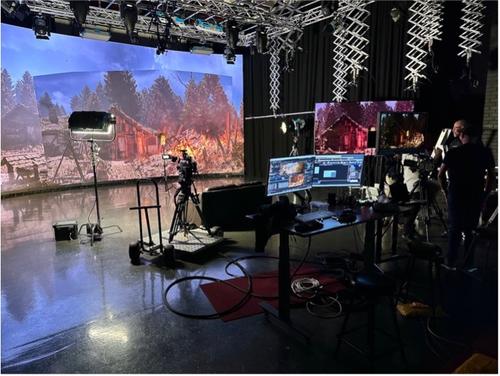
LED volumes display virtual environments directly during filming, letting actors and camera operators interact with final imagery in real time. That brings realistic interactive lighting, less post-production compositing, and faster creative decisions on set.
Industry adoption continues to accelerate: Mordor Intelligence reports LED volume stages expanding at more than 30 percent annually as panel costs fall, and cites field research showing 20 to 50 percent reductions in greenhouse-gas emissions when productions move from location shoots to real-time LED stages.
The Best Platforms Support Both
Studios should not treat greenscreen and LED as mutually exclusive. A scalable platform should support both without requiring a change of software, tracking technology or process as facilities evolve.
Why Integrated Robotics Matter
What Are Virtual Production Robotics and Why Do They Matter?
Virtual Production robotics are encoded, motorised camera systems, including remote heads, cranes and rails, that stream precise positional data to the rendering engine.
That positional data keeps physical and virtual camera movement synchronised, which is essential for reliable real-time production.
Why Encoding Matters
For camera movement to register accurately inside Unreal Engine, the rendering system needs precise positional data. Encoded robotics continuously transmit that data, increasing the robustness of camera tracking data, ensuring reliable sync between physical and virtual environments.
Integration Is More Valuable Than Individual Components
Studios often evaluate robotics separately from tracking and rendering, but these technologies work best when they share the same positional information as part of one ecosystem. That reduces integration effort and creates a more reliable workflow.
The Mo-Sys Approach: Robotics
Mo-Sys develops robotics, camera tracking and Virtual Production software as complementary technologies rather than independent products. Solutions like L20, MoRail, eCrane and VP Pro operate together, letting positional data and workflows move seamlessly between hardware and software and supporting everything from compact single-camera studios to large multi-camera broadcast environments.
Buyer Considerations
When evaluating robotics for Virtual Production, ask:
- Are camera movements fully encoded?
- Does the system integrate directly with the tracking system?
- Can the same robotics be used across greenscreen and LED productions?
- Is the hardware supported by the same supplier as the software?
How to Choose a Virtual Production Platform That Can Scale With Your Studio
A scalable platform supports single-camera, multi-camera broadcast and hybrid greenscreen and LED workflows on the same architecture, so studios can expand without replacing core technology.
A common mistake is choosing a platform that meets today’s requirements but cannot support tomorrow’s. Rather than asking whether a platform supports today’s productions, ask whether it can evolve as those productions become more ambitious.
What Does a Scalable Virtual Production Platform Look Like?
Scalability spans three areas at once:
Production Scale
Single-camera productions, multi-camera broadcast studios, and hybrid greenscreen and LED environments should all be possible without separate software platforms.
Technical Scale
New Unreal Engine releases, additional tracking and robotics, and cloud-based workflows should be adopted incrementally rather than by replacing existing infrastructure.
MarketsandMarkets projects the virtual production market to grow from $2.1 billion in 2025 to $8.76 billion by 2030, a 33.1 percent CAGR, citing cloud-based workflows that let dispersed teams collaborate in real time as a key driver of that growth.
Operational Scale
Multiple operators, standardised workflows, and repeatable production templates become increasingly important for broadcasters and universities producing high volumes of content.
Why Real-Time Performance and Reliability Matter More Than Peak Benchmarks
Real-time performance in Virtual Production means consistently smooth, stable rendering while handling complex scenes, multiple cameras, tracking and robotics, not just high frame rates in ideal test conditions.
Real-time rendering generates photorealistic computer graphics instantly during production rather than taking minutes or hours per frame. That lets directors and talent see the final virtual environment live.
Performance is not defined by frame rate alone. A platform needs to stay stable and predictable while managing complex Unreal Engine scenes, tracking, calibration, multiple cameras, robotics and live compositing simultaneously.
Looking Beyond Purchase Price: Total Cost of Ownership
Purchase price is only part of the investment. Studios should also weigh software licensing, integration, training, technical support and future expansion. A platform with a higher upfront cost can still deliver a lower total cost of ownership if it reduces complexity and scales without major architectural changes.
The Mo-Sys Approach: Scalable Ecosystem
Mo-Sys designs its ecosystem around long-term scalability rather than isolated products. VP Pro, MoStudio, StarTracker, robotics and calibration tools operate together while staying compatible with wider industry workflows, letting studios expand from a compact installation into larger broadcast or LED facilities without changing the underlying architecture.
Step-by-Step: How to Choose a Virtual Production System
- Define your primary production use cases. Clarify whether you are prioritising broadcast news, sports, film, scripted drama, education, or corporate production.
- Decide on your main production environment. Choose whether you will start with greenscreen, LED volumes, or a hybrid approach based on the productions you expect to deliver.
- Evaluate platform architecture first. Decide whether you want direct Unreal Engine access through a plugin-based approach or a closed system with more limited flexibility.
- Assess camera tracking and robotics integration. Check how tracking and robotics are encoded, how they integrate with your rendering engine, and whether they share a single support path.
- Plan for scalability and total cost of ownership. Model how easily the platform can grow from single-camera to multi-camera and LED, and factor in licensing, training and support.
How to Choose the Right Virtual Production System
Selecting a platform is about more than comparing features. Evaluate the underlying architecture and whether it can keep supporting new requirements over time, since a broadcaster’s daily news needs differ from a film studio’s in-camera VFX work or a university’s teaching facility.
Across every production type, the same principles apply: direct rendering access, reliable tracking, tight hardware and software integration, support for both greenscreen and LED, and room to expand. Studios that focus only on individual features often miss the decisions that determine long-term success.
Virtual Production Buyer’s Checklist
Before investing in a Virtual Production platform, ask whether it provides:
Creative Capability Checklist
- Direct access to the render engine (Unreal Engine).
- Flexible creative control.
Tracking and Rendering Checklist
- Accurate, robust and reliable camera tracking.
- Stable real-time rendering.
Integration Checklist
- Native integration between tracking, robotics and rendering.
- Centralised support.
Scalability Checklist
- Support for greenscreen and LED volumes.
- Expandable production architecture.
Long-Term Value Checklist
- Low operational complexity.
- Lower total cost of ownership over time.
Why the Mo-Sys Ecosystem Is Different
Mo-Sys approaches Virtual Production as an integrated ecosystem rather than a collection of individual products, combining VP Pro, MoStudio, StarTracker, robotics and calibration tools within a unified architecture that expands from a compact installation into sophisticated multi-camera broadcast or LED environments.
GII Research’s market analysis lists Mo-Sys Engineering among the sector’s recognised competitive players alongside Epic Games, Nvidia, Sony, and ARRI.
Next Steps: Planning Your Virtual Production Studio with Mo-Sys
If you are evaluating Virtual Production systems for broadcast, film or education, Mo-Sys can help map requirements to practical architectures using VP Pro, MoStudio, StarTracker and integrated robotics.
Studios planning a specific project or upgrade should compare not only features, but also the architecture that will shape long-term flexibility, support and operational resilience.
Yes. Many broadcasters add tracking, rendering and automation incrementally before expanding into LED walls, without replacing their whole infrastructure.
Yes, if the platform is built for it. A scalable system can support a move to multi-camera or LED production without replacing the underlying architecture.
You choose the right system by evaluating its architecture, tracking, hardware integration, real-time performance and scalability against your core production use cases.
Yes. A plugin-based system is well suited to broadcast when it is combined with an operational layer that gives directors and operators intuitive workflows on top of direct engine access.
It is the leading real-time rendering engine in the industry, though platforms differ in how much direct access they give to its native functionality.
Most broadcast and education studios start with greenscreen for flexibility, while film and high-end commercial work tends to favour LED volumes for real-time in-camera visual effects.
Marker based, as they are more accurate and reliable than markless systems.
A Virtual Production system is the combination of real-time rendering, camera tracking, compositing and control tools that lets teams blend live-action with virtual environments during production.
Real-time rendering is the generation of photorealistic computer graphics instantly during production rather than over minutes or hours per frame, allowing talent and directors to see the final environment live.
A plugin extends Unreal Engine while keeping teams working directly within it. A platform is the complete environment, including rendering, tracking, robotics, operational tools and workflow management.
Inside-out tracking places sensors on the camera to observe markers or features. Outside-in tracking uses external sensors to observe the camera. Both can be accurate, with trade-offs depending on studio layout.
Virtual Production is the broader workflow of combining live-action with real-time CG environments. ICVFX is a specific technique where rendered environments are displayed on LED walls so the effect is captured in-camera.
Studios should factor in licensing, integration, training, maintenance and future expansion alongside purchase price. A higher upfront cost can still mean lower total cost of ownership if the platform reduces complexity.
The best camera tracking technology remains marker-based systems that are especially suitable for permanent installations needing repeatable accuracy, as markerless systems tend to introduce positional drift, making them unreliable.
Encoded robotics continuously transmit accurate positional data to the rendering engine, keeping virtual and physical camera movement synchronised.
It lets teams use the engine’s latest features and adopt new capabilities as it evolves, reducing dependence on vendor-specific updates.
Systems perform best when tracking, rendering, robotics and software are designed to work together, reducing deployment complexity and easing maintenance.