Turnkey Greenscreen Virtual Production Studios in 2026: Benefits, Components and LED Comparison
28 October 2026
Executive Summary: A turnkey greenscreen Virtual Production studio combines camera tracking, real-time rendering, keying and monitoring in one integrated, supported system. Greenscreen remains one of the fastest routes to real-time Virtual Production, particularly for wide shots and large shooting areas. Mo-Sys delivers it with StarTracker camera tracking and VP Pro compositing inside Unreal Engine, on a platform that also supports LED when the business needs it.
At a glance: when to choose greenscreen or LED
Greenscreen is the efficient choice when a production needs flexible spaces for wide shots or big camera moves without the need for a physical LED environment in every shot.
- Choose greenscreen for flexible, large shooting areas and multi-camera formats, backed by controlled lighting, reliable keying and real-time rendering.
- Choose LED when in-camera backgrounds, interactive light, natural reflections or a visible environment for performers are central to the production.
- Consider a hybrid facility when different content formats benefit from different workflows.
- Compare complete proposals, including infrastructure, staffing, content preparation, commissioning, training and support, not just backdrop materials alone.
The all-in-one studio question: LED volume or greenscreen?
Studios planning a Virtual Production space typically choose between an LED volume, a chromakey cyclorama or a combination of both. LED offers interactive lighting, reflections and a visible environment for performers. Greenscreen remains highly relevant for broadcasters, corporate studios, education providers and rental facilities, and for larger sets it is often the more efficient choice.
For a wider buyer's guide covering LED, XR and AR systems, see How to Choose a Virtual Production System in 2026.
What is a turnkey greenscreen Virtual Production studio?
A turnkey greenscreen Virtual Production studio is an integrated system combining a chromakey backdrop, camera tracking and lens encoding, real-time rendering, keying and preview monitoring, with installation and support defined in one project scope. Talent is filmed against a green or blue backdrop while tracking data drives a matching virtual camera. The live camera feed and rendered scene are composited in real time. Robotics, automation and motion capture are optional additions, not defining requirements.
Understanding Virtual Production platforms for studios
A Virtual Production platform is the software and hardware layer that takes camera tracking data, renders a matching virtual scene in real time and composites it with live video. Approaches across the market differ. Some providers build their offering around media servers for LED stages and live events, while others focus on broadcast graphics and connect to third-party tracking. As a result, many studios end up assembling tracking, rendering and control from separate suppliers.
The Mo-Sys ecosystem: one platform from tracking to final output
Mo-Sys designs and manufactures camera tracking, virtual production software and camera robotics built to work together, giving studios one supplier for the core of the signal chain. Cameras, lenses, lighting and video infrastructure are specified around them.
- VP Pro runs as a native plugin inside Unreal Engine, acting as real-time compositor, synchroniser, keyer and recorder. The full Unreal toolset stays available to the studio's artists.
- Chromakey as a first-class workflow. VP Pro's Pro tier is built for greenscreen, with an internal chromakeyer plus pre-keyer and post-keyer modes for external hardware keyers. XR and XR Multi-cam tiers add LED on the same software.
- StarTracker supplies absolute, drift-free camera tracking for greenscreen or LED.
For studio owners, one integrated supplier simplifies coordination, commissioning and support. Mo-Sys packaged studio solutions are configured for each facility, with a defined scope of components, installation and support.
Best Virtual Production tracking solutions compared
Camera tracking is the foundation of any virtual studio: if the system loses position or drifts, the virtual set slides and the illusion breaks. Rendering quality cannot compensate for unstable tracking. Four approaches dominate the market.
| Tracking method | How it works | Strengths | Watch-outs | Best fit |
|---|---|---|---|---|
| Optical marker-based (inside-out) | Camera-mounted sensor reads a fixed map of retro-reflective markers on ceiling, walls or floor | Absolute positioning; repeatable reference map; not dependent on natural scene features | Requires marker installation and sufficient sensor visibility; confirm coverage and calibration requirements | Greenscreen, LED and hybrid studios; live broadcast |
| Markerless (feature-based / vSLAM) | Camera recognises natural features in the scene | No markers, quick to deploy on location | Can struggle on featureless surfaces such as a plain green cyc, or as lighting changes | Location work and suitable feature-rich environments; deployment-dependent fallback |
| Optical outside-in | Array of fixed cameras tracks markers on the camera rig | High accuracy within the capture volume | More hardware; occlusion when talent or crew block lines of sight | Motion capture stages |
| Mechanical / encoded | Encoders on heads, pedestals or cranes report movement | Precise on the axes measured | Tracks the instrumented axes; accuracy depends on the mechanism, calibration and implementation | Fixed-position or crane shots |
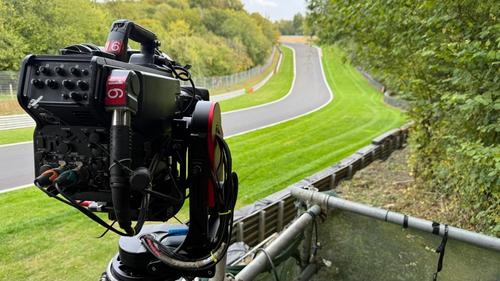
For permanent greenscreen studios, inside-out optical marker-based tracking is the most dependable choice: it delivers absolute positioning and repeatability without relying on natural scene features. Mo-Sys specifies StarTracker Max for studios up to 100 x 100 m and ceiling heights of 16 m or more, with six-axis camera tracking, lens zoom and focus data, and FreeD and OpenTrackIO output.
"The absolute optical tracking technique removes the 'drift' problems often associated with markerless methods. This 'drift' often results in graphics that slowly drift away from their true position in the real world."
— Michael Geissler, CEO, Mo-Sys Engineering (source)
Camera tracking for broadcasters in Virtual Production
Broadcasters need tracking that behaves identically on every show, because live television has no second take. A news bulletin, election night or sports magazine may run for hours with several cameras moving at once, so small errors that a film crew could fix in post become visible on air.
When evaluating camera tracking for a broadcast virtual studio, prioritise:
- Absolute positioning with zero drift. Graphics and virtual sets must stay locked through long sessions and full 360-degree pans.
- No routine recalibration. Once a permanent greenscreen studio’s StarTracker tracking system has been calibrated, no further calibration is needed in that studio.
- Calibrated lens data. Zoom and focus must be tracked, with lens distortion and depth of field applied automatically.
- Open protocols. FreeD and OpenTrackIO keep tracking data compatible with any renderer that implements them. OpenTrackIO is a free, open-source protocol from the SMPTE RIS OSVP group, presented at the 2024 SMPTE Media Technology Summit by Mo-Sys’s James Uren as chair of SMPTE’s camera tracking committee (Digital Media World).
- Robotics integration. Tracked robotic heads, pedestals and rails let a small crew run multi-camera shows.
- Resilience in the studio environment. Lighting rigs, talent movement and set changes should not interrupt tracking.
Marker-based optical tracking is well suited to feature-poor greenscreen environments, which is why it is so widely used in broadcast virtual studios. Markerless systems are useful on location but rely on natural scene features, and NewscastStudio notes that plain stages offer “very few natural reference points for tracking to pick up on.”
In Belgium, for example, Dreamwall pairs StarTracker Max with a six-metre curved MoRail that orbits presenters in its greenscreen studio, producing RTBF's daily climate programme Quel Temps pour La Planète? with live camera movement through its virtual sets.
Why greenscreen remains highly relevant, especially at scale
Greenscreen remains highly relevant because it separates the filmed foreground from the rendered background. A single chromakey space can host any virtual environment, from a news desk to a stadium, without rebuilding a physical set, and its efficiency grows with the size of the set.
Why is greenscreen more efficient for larger sets?
Every extra square metre of LED wall adds display hardware, processing and infrastructure, as The Broadcast Bridge explains in its LED wall design guide. Greenscreen avoids that display surface: a larger cyc still needs good construction, lighting and spill control, but rendering requirements are driven by camera count, resolution and scene complexity, not room size.
Complementary to LED, not in competition with it
LED volumes offer natural reflections, interactive light and an environment presenters can see. Greenscreen needs careful lighting and spill control, and reflective or transparent subjects make keying more demanding. Many facilities will use both, and a hybrid platform lets the studio choose the right workflow for each production.
Greenscreen versus LED: how to compare proposals
Consider a broadcaster planning a three-camera studio with two presenters, wide shots, one moving camera and daily virtual set changes. The fair test is to ask greenscreen and LED suppliers to deliver the same programme format at the same output quality, then compare them area by area using the checklist below. (Illustrative scenario, not a customer benchmark.)
Decision rule: choose greenscreen when it meets the required shots and quality at a lower evaluated total cost; choose LED where its physical lighting, reflection or performer benefits justify the additional display infrastructure.
Buyer comparison checklist
Use the same production brief and acceptance criteria for every supplier.
| Evaluation area | Greenscreen questions | LED questions |
| Image and lighting | Can key edges, spill, hair, fine detail and reflective subjects meet the brief? | Are reflections, interactive lighting and display appearance suitable for the shots? |
| Camera movement | Does tracking remain stable across planned moves and camera coverage? | Are tracking, display geometry and image processing suitable for planned moves? |
| Infrastructure | What cameras, tracking, render nodes, keying, sync and monitoring are required? | What LED panels, processing, render capacity, sync, colour management and monitoring are required? |
| Operations | What lighting, keying, rehearsal, set preparation and crew tasks are needed? | What display maintenance, content preparation, calibration and crew tasks are needed? |
| Whole-life cost | What are the construction, lighting, rendering, staffing and support costs? | What are the display, processing, power/cooling, maintenance, staffing and support costs? |
| Acceptance test | Can representative wide shots, close-ups, zooms and moving shots pass agreed criteria? | Can equivalent shots pass agreed image, tracking, colour and reflection criteria? |
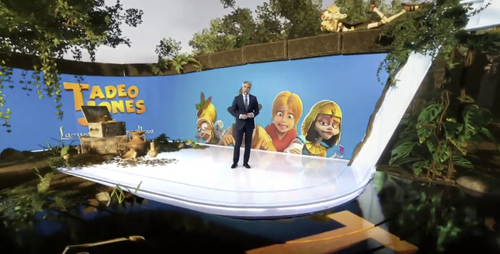
Case study: Informativos Telecinco takes viewers inside the 2025 Conclave
Large-scale chromakey made it possible for Spanish broadcaster Informativos Telecinco to take viewers inside the Sistine Chapel during the 2025 papal conclave, a location no camera could enter. Presenter Carlos Franganillo guided audiences through the secret ballot, the smoke signals and the announcement from St Peter's Basilica, with fly-overs of St Peter's Square and Vatican City.
The quick-turnaround featurette was produced with Madrid-based Virtual Production specialist MR Factory, using Mo-Sys StarTracker camera tracking and VP Pro (Mo-Sys). Franganillo was filmed against what Telecinco described as "un enorme croma azul" (a huge blue chromakey set) over almost 12 hours of shooting with several cameras, one following him through each scene (Telecinco).
MR Factory built the virtual chapel from historical documentation, down to the cherry-wood chairs set out for the 133 cardinal electors (Panamericana). The format was proven before Rome: in October 2024, Telecinco and MR Factory used a minimalist chromakey set to place Franganillo at the 1787 Philadelphia Convention and inside the US Capitol for its presidential election coverage (Xataka).
The production shows what chromakey does best: rebuilding an inaccessible, monumental space on a studio stage, tracked across multiple cameras and delivered to air on a news deadline.
What a turnkey greenscreen Virtual Production studio includes
A turnkey Mo-Sys greenscreen studio defines the complete signal chain, with one supplier responsible for commissioning and support. It typically includes:
- Camera tracking: StarTracker on every camera, with a marker map unique to the studio.
- Real-time engine: VP Pro running inside Unreal Engine on GPU render nodes, delivered as mobile racks or integrated into existing servers.
- Keying: VP Pro's internal chromakeyer, or an external hardware keyer in pre-keyer or post-keyer mode.
- Preview and monitoring: MoViewer for director preview of off-air cameras, plus a system status monitor.
- Optional robotics and automation: MoRail and the L20 remote head for repeatable moves, with FramePilot for automated presenter framing.
- Optional interaction tools: MoCaptury suit-less motion capture for presenter interaction with AR elements.
- Core project services: site assessment, installation, commissioning, operator training and an agreed support plan.
"Virtual Production is a cocktail of technologies, with quite a lot of complexity in the technology chain. Mo-Sys has done a huge amount of work, behind the scenes, making the installation process easier, without reducing the system's flexibility or restricting creative freedom."
— James Uren, CTO, Mo-Sys Engineering (source)
How does real-time greenscreen compositing differ from LED ICVFX?
In a real-time greenscreen workflow, VP Pro combines the live camera feed with an Unreal Engine scene, so the finished composite can be monitored, recorded or sent straight to air. This differs from LED in-camera VFX, where the camera photographs the displayed background with the subject. VP Pro also records tracking and lens data for higher-quality re-renders later.
A path to LED when the business needs it
StarTracker and VP Pro support both greenscreen and LED, so a studio can add an LED wall later while keeping its tracking, software and operator expertise. The LED project still needs its own display system, processing, synchronisation, colour management and commissioning.
"At Mo-Sys, we integrate technology that isn't just appropriate now, but will be relevant for the foreseeable future."
— Michael Geissler, CEO, Mo-Sys Engineering (source)
Conclusion: greenscreen, built for scale
Greenscreen has not been replaced by LED; it has been joined by it. For larger shooting areas, multi-camera shows and frequent virtual set changes, chromakey remains one of the fastest routes to real-time Virtual Production.
A turnkey Mo-Sys studio combines StarTracker camera tracking and VP Pro real-time compositing, with robotics and automation available where needed. It delivers broadcast-ready output today, with a clear path to LED when the business case is there.
Planning a greenscreen Virtual Production studio?
Discuss your studio dimensions, camera count, intended content formats and required camera moves with the Mo-Sys team to scope a system around your production brief. Ask for an itemised proposal including core equipment, third-party components, facilities work, commissioning, training, optional enhancements and ongoing support.
Suggested next step: request a turnkey studio consultation or technical specification review via the Mo-Sys website.
Yes. Mo-Sys StarTracker and VP Pro support both formats, so tracking, software and operator training carry over. The LED display, processing, synchronisation and rendering capacity are scoped as a separate project.
No. Camera robotics, automated framing and motion capture are optional capabilities. Include them where they support the programme format, staffing plan or required camera moves.
Product capabilities are taken from current Mo-Sys documentation, and manufacturer statements are identified as such. Customer examples link to the original broadcaster, production partner or case-study source.
The schedule depends on site readiness, equipment delivery, marker installation, lens calibration, integration, testing and operator training. Mo-Sys states that StarTracker’s own setup takes around three hours, but that is one step within the full project timeline.
Cost depends on studio size, camera count, lens types, output resolution, rendering capacity, keying, cyc construction and lighting, facilities work and optional robotics. Request an itemised quotation against a defined production brief that separates equipment, software licences, installation, training and ongoing support, and compare both initial and operating costs.
Often, yes. Greenscreen avoids covering a large area with LED panels and their processing, and rendering scales with camera count rather than room size. It still needs a well-built cyc, good lighting and keying, so compare proposals at equivalent camera counts and output quality.
Yes. Greenscreen remains one of the most versatile and efficient formats for broadcast, corporate and education studios, particularly for larger sets and frequent environment changes. Paired with precise camera tracking and real-time Unreal Engine compositing, it delivers finished virtual set shots live.
Greenscreen needs consistent backdrop lighting and spill control, and reflective, transparent or finely detailed subjects make keying more demanding. Presenters cannot see the virtual environment, so preview monitors or visual cues help. Real-time quality also depends on scene complexity and rendering capacity, so include representative shots in acceptance testing.
Inside-out optical marker-based tracking is the most dependable option for permanent greenscreen studios because it uses installed reference markers rather than natural features in a plain backdrop. Mo-Sys StarTracker, which Mo-Sys describes as the world’s best-selling absolute tracking solution, provides drift-free camera and lens tracking without daily recalibration.
Marker-based tracking calculates camera position from fixed reference markers installed in the studio, so it is absolute and repeatable. Markerless tracking identifies natural features in the scene, which is faster to deploy on location but can be less stable on plain backdrops or under changing light.
Spain's Informativos Telecinco used Mo-Sys StarTracker and VP Pro, with production partner MR Factory, to recreate the Sistine Chapel on a large chromakey set for its 2025 Conclave coverage. In Belgium, Dreamwall produces RTBF's daily climate programme in a greenscreen studio tracked by StarTracker Max.